Overview
UltraDNS2 combines the UltraDNS resolution network with a second global DNS anycast network operated by a leading anycast cloud provider. The service gives customers the redundancy of a separate DNS network while preserving the advanced features and management experience of UltraDNS.
After UltraDNS2 is enabled for an account, zone data begins flowing to both the UltraDNS network and the UltraDNS2 network. The account must still be configured correctly at the registrar so the domain delegates to the UltraDNS2 name servers.
Before You Begin
- UltraDNS2 must be enabled for the account before zones can use the UltraDNS2 network.
- The UltraDNS2 name servers must be delegated at the registrar. This is done outside of UltraDNS.
- Do not delete default NS records generated for UltraDNS or UltraDNS2. Removing required NS records can cause domain or account service issues.
- Use the UltraDNS Portal to verify whether each zone is
ActiveorInactivefor UltraDNS2.
Account Configuration
When UltraDNS2 is turned on for the account, zone information is copied to both the UltraDNS and UltraDNS2 networks. After that account level enablement is complete, configure the name server details so the domains can use the additional network.
The registrar delegation is a required external step. UltraDNS can show the required name server values, but the domain's registrar controls which authoritative name servers are delegated for the domain.
Update Name Server Records With the Registrar
Delegate the UltraDNS2 specific name servers at the registrar for each domain that should use UltraDNS2. The name server records for both UltraDNS and UltraDNS2 are available in the Nameserver Records List area of the UltraDNS Portal.
Portal Changes
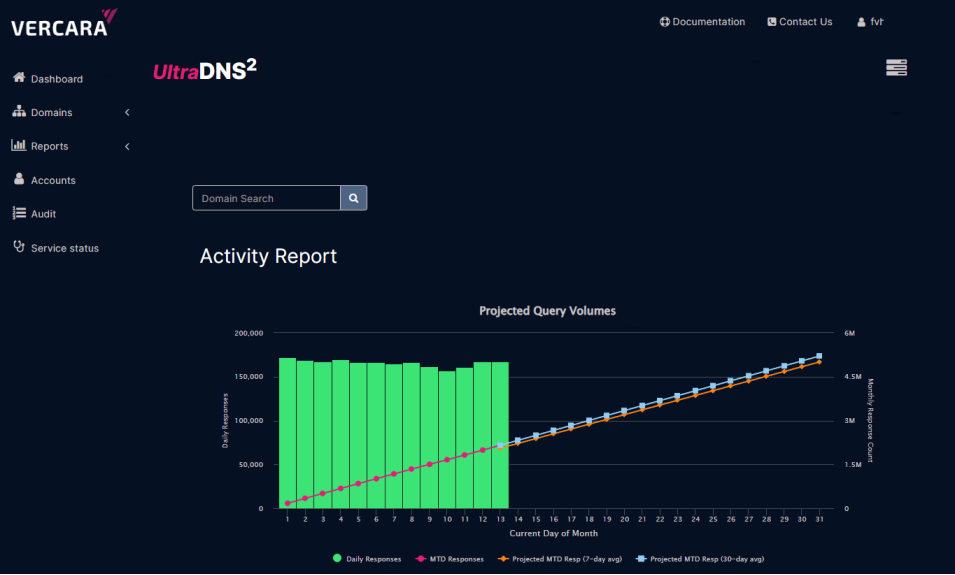
UltraDNS2 intentionally keeps most portal behavior the same as standard UltraDNS. The main visual indicators are the UltraDNS2 logo, the UltraDNS2 status column on the Domains page, and the additional UltraDNS2 reporting and account details.
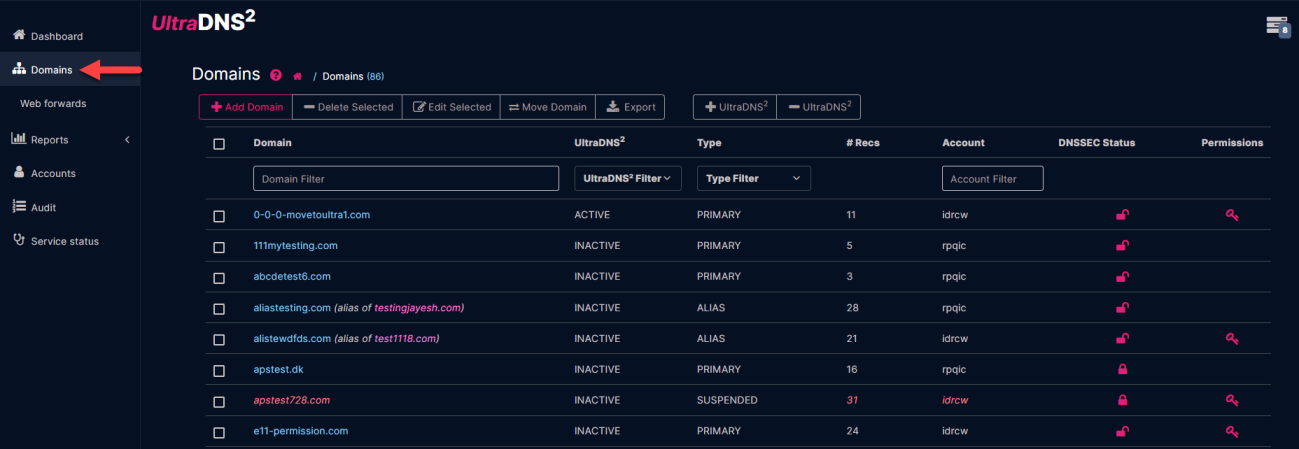
Domains Page
Accounts enabled for UltraDNS2 display an additional UltraDNS2 column on the Domains page. This column provides a quick view of whether a zone is active or inactive on the UltraDNS2 network.
Active: The account has UltraDNS2 enabled and the zone has the required UltraDNS2 name servers configured.Inactive: The account has UltraDNS2 enabled, but the zone does not yet have the required UltraDNS2 name servers configured.
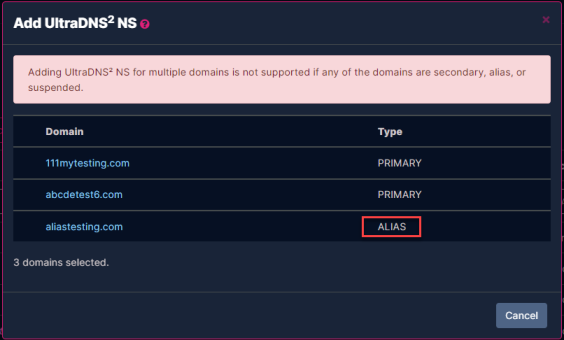
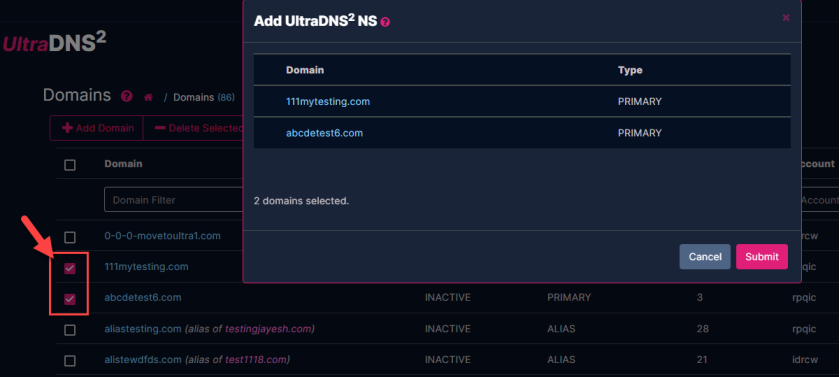
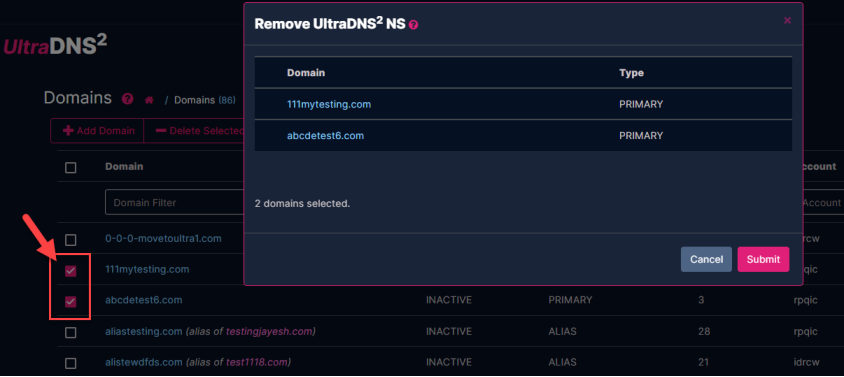
Bulk Add or Remove UltraDNS2 Domains
The Add / Remove UltraDNS2 function lets you select multiple domains and apply UltraDNS2 service to them in bulk, or revert UltraDNS2 enabled domains back to standard UltraDNS domains. When the operation is completed, the selected domains are updated according to the requested action.
If the selected domains cannot be updated, the portal displays an error. Review the affected domains and correct the issue before repeating the bulk operation.
SOA Change
The SOA record details continue to be managed from UltraDNS. When UltraDNS2 is enabled and configured, the associated zone information is copied to both networks as part of the UltraDNS2 service behavior.
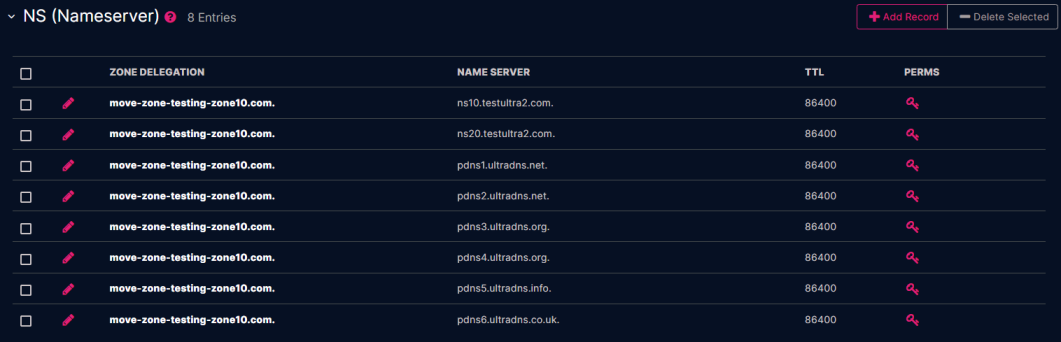
Nameserver Records List
The Nameserver Records List shows the name server record details associated with the account. Use this list to identify the UltraDNS and UltraDNS2 name servers that need to be delegated externally.
Reports
UltraDNS2 enabled accounts include additional reporting context so customers can review network level DNS traffic behavior.
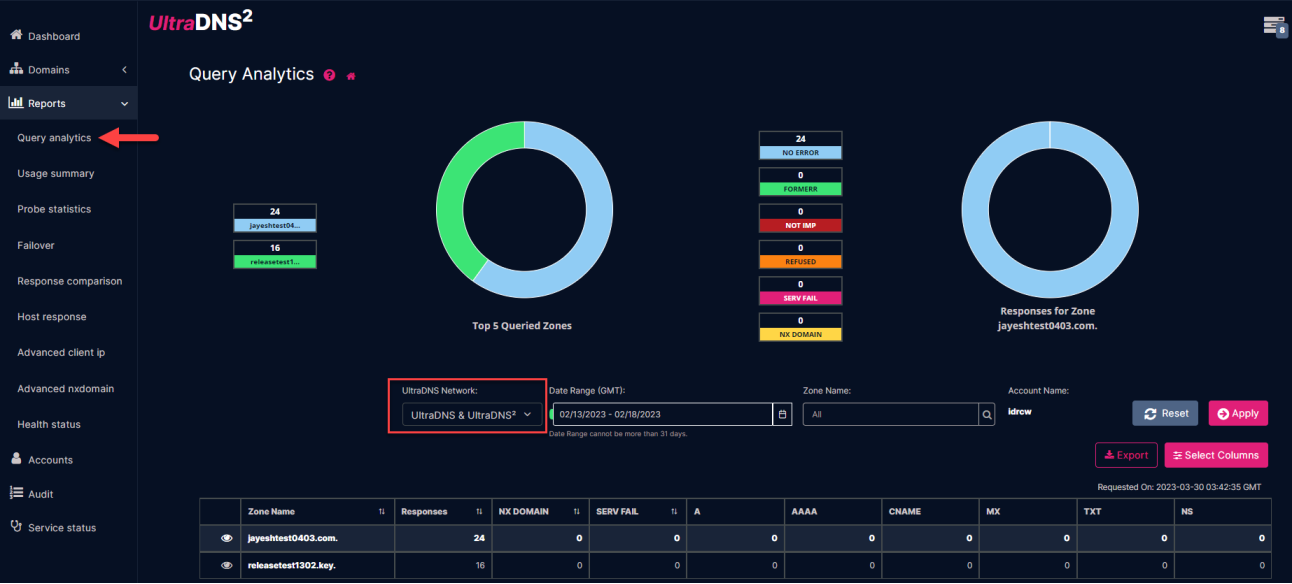
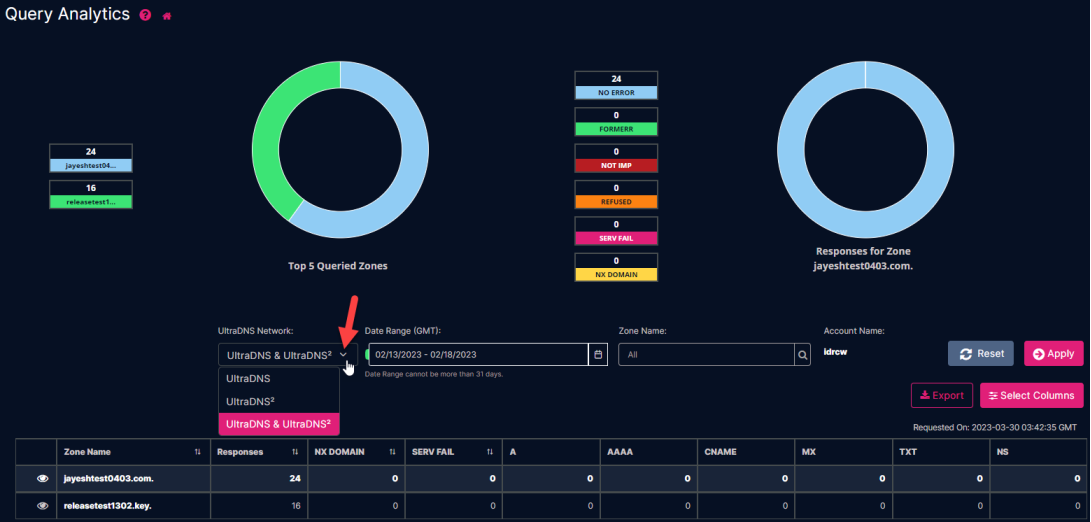
Query Analytics
The Query Analytics report can show activity for UltraDNS networks. Use the report controls to review traffic and compare the relevant UltraDNS network data for the account.
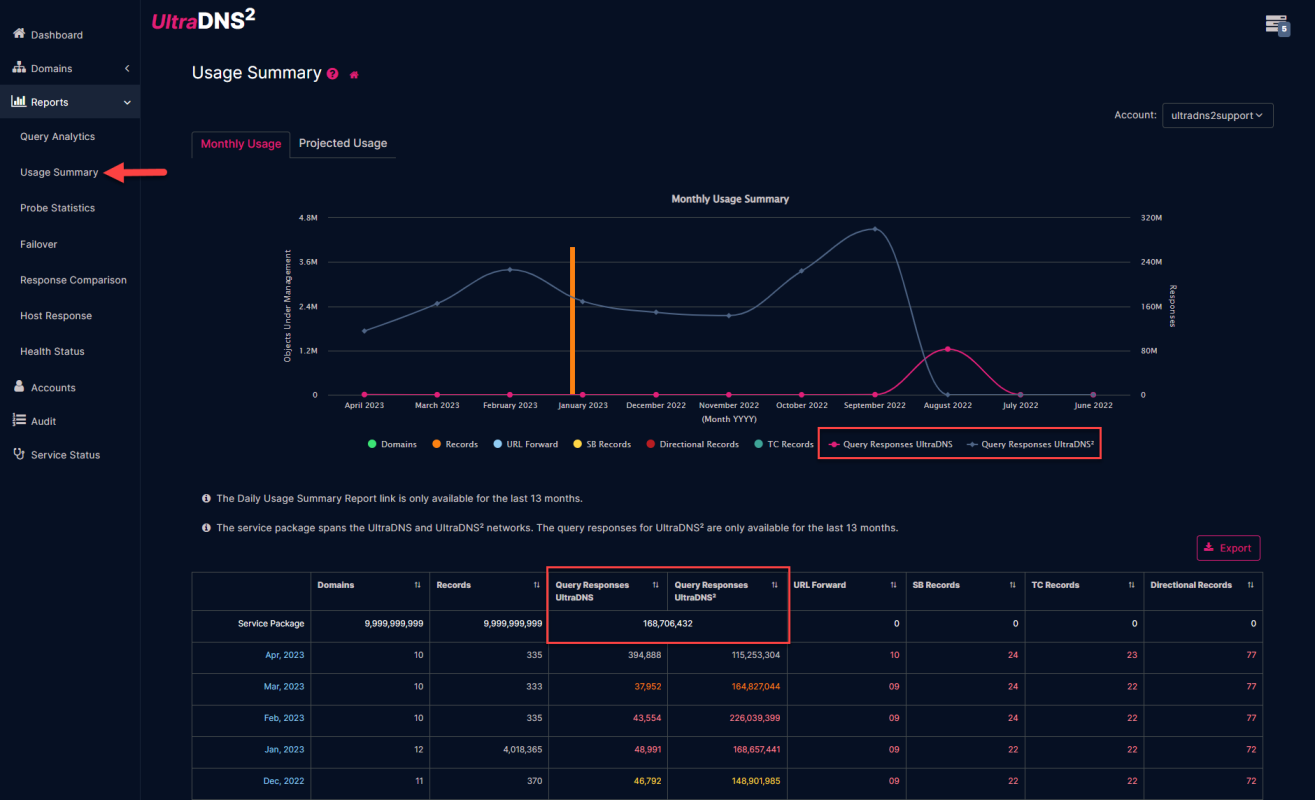
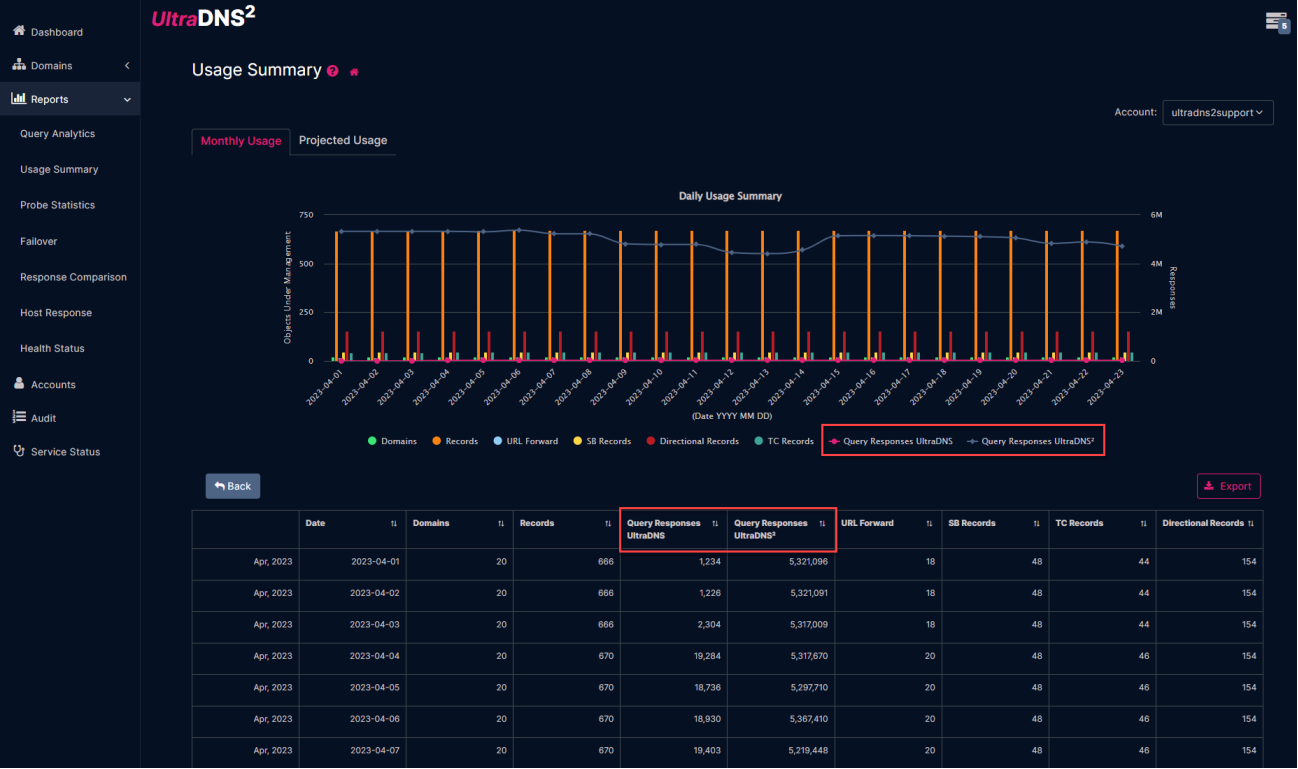
Usage Summary Report
The Usage Summary report includes UltraDNS2 enabled usage details. Use the daily or summary view to review account usage for UltraDNS2 enabled zones.
API Changes
UltraDNS2 introduces API response fields and query behavior that identify whether a zone or record is associated with the UltraDNS2 network. These fields are only applicable to accounts that have UltraDNS2 enabled.
Resource Record Sets DTO
The ultra2SystemGenerated field indicates whether the name server in an rdata list is generated by the UltraDNS2 system. This field is returned only for accounts with UltraDNS2 enabled and associated NS records.
Attribute | Description | Type | Required? |
|---|---|---|---|
ownerName | The domain name of the owner of the RRSet. Can be either:
If a FQDN, it must be contained within the zone name FQDN. | String. | NO for PUT, POST, or PATCH calls. Ignored if present. Not present (and ignored if present) if this RRSet is embedded inside of an Owner structure. |
rrtype | Resource Record Type for the RRSet. Must be formatted as the well-known resource record type (A, AAAA, TXT, etc.) and the corresponding number for the type, between 1 and 65535 or a known resource record name (A, AAAA, SRV, etc.). | String. | NO for PUT, POST, or PATCH calls. Ignored if present. Not present (and ignored if present) if this RRSet is embedded inside of an Owner structure. |
ttl | The time to live (in seconds) for all records in the RRSet. Must be a value between 0 and 2147483647, inclusive. | Integer. | Should be included in PUT, POST or PATCH calls. If TTL is not specified, the value set at the account level (either for record type or global setting) will be used. |
rdata | The data for the records in the RRSet. Must use the BIND presentation format for the specified rrtype. For MX, NS, CNAME, PTR, and APEXALIAS record types, the rdata value cannot be relative to the zone name. It must be a FQDN. If rrtype is MX, entering “0 .” will create a NULL MX record, implying that “No Service” is available for the server / record. | Array. | REQUIRED for PUT, POST, or PATCH calls. Must include BIND formatted data. If a null MX record exists for a zone, no additional MX records are allowed. Additionally, if an MX record exists within a zone, a Null MX record cannot be created. |
systemGenerated | Indicates whether the record in an rdata list is system generated or not.
It represents the Boolean value that corresponds to the record in the list (in same order the records are returned). | Array (Boolean). | Will be returned for GET requests when used as the query parameter systemGeneratedStatus.
If the query parameter is set to true, then the attribute name will be returned in the response.
Ignored for PUT/PATCH/POST requests. |
ultra2SystemGenerated | Indicates whether the nameserver in an rdata list is generated by the UltraDNS2 system or not. | Array (Boolean) corresponding to the nameserver in the list. | ultra2SystemGenerated will only be returned for those accounts which have UltraDNS2 enabled, as well as the associated NS records. |
Zone API and DTO
The ultra2 field indicates whether a zone has UltraDNS2 enabled. For zone listing, the network query operator can return zones from the standard UltraDNS network or the UltraDNS2 network.
|
Attribute |
Description |
Type |
|---|---|---|
|
name |
Name of the zone, with trailing periods (….) Must be a valid domain name. |
Required for zone creation. Ignored if present on update. |
|
accountName |
Name of the account. |
String. Required for zone creation. Ignored if present on update. |
|
type |
Type of zone. Valid values are PRIMARY, SECONDARY or ALIAS. |
Required for zone creation. Ignored if present on update. |
|
owner |
Name of the user that created the zone. |
Returned in GET responses for zone information. Ignored if present on create or update. |
|
recordCount |
Number of records in the zone. |
Returned in GET responses for zone information. Ignored if present on create or update. |
|
dnssecStatus |
Whether or not the zone is signed with DNSSEC. Valid values are SIGNED or UNSIGNED. |
Returned in GET responses for zone information. Ignored if present on create or update. |
|
lastModifiedDateTime |
The last date and time the zone was modified, represented in ISO8601 format. |
Returned in GET responses for zone information. Ignored if present on create or update. |
|
ultra2 |
Only applicable to accounts that have enabled the UltraDNS2 service. Indicates if the zone has UltraDNS2 enabled or not. Valid values are false and true. |
Boolean. Returned in GET responses for zone information. |
Attribute | Description | Type |
|---|---|---|
| q | The query used to construct the list. Query operators are:
| String. |
| cursor | Can be provided after the initial List Metadata for Zones request. Use with the cursorInfo details for fetching the next, previous, first or last page(s) of details. | String. Optional. |
| limit | The maximum number of rows requested. Default is 100. | Integer. Optional. |
Customer Support Information
If UltraDNS2 behavior does not match the expected account or zone state, collect the account name, zone name, UltraDNS2 status shown in the portal, registrar delegation details, and any visible portal or API error before contacting Customer Support.
Expected Outcome
After UltraDNS2 is enabled, configured, and delegated correctly, selected zones can use both the UltraDNS and UltraDNS2 networks. The portal should show the appropriate UltraDNS2 status, the registrar should delegate the required name servers, and reports should include the expected UltraDNS2 network information.
Important Notes
- UltraDNS2 account enablement and registrar delegation are separate requirements.
- UltraDNS can display name server values, but registrar delegation is completed outside the UltraDNS Portal.
- Do not delete default NS records generated for UltraDNS or UltraDNS2.
- API fields related to UltraDNS2 are applicable only to UltraDNS2 enabled accounts.