Postman Collection for API Testing
Completed
Hello UltraDNS Community!
I'm excited to share a resource that can help streamline your experience with the API. I’ve developed a Postman collection designed to serve as a foundational framework for interacting with UltraDNS, handling authentication, and automating task and report retrieval through pre- and post-request scripts.
You can find the GitHub repository here: https://github.com/vercara/ultradns-postman
Overview
This is a curated set of requests built from hands-on experience with the UltraDNS API. It offers a solid starting point for anyone looking to understand or extend the API’s functionalities. It includes:
- Authentication and Utilities: The pre-request script handles authentication and includes a globally-scoped utils object for reusable functions.
- Resource Organization: Each folder represents a base resource (e.g., zones) or a specific functionality (e.g., push notifications).
- Task and Report Management: Automates the handling of tasks and reports, storing relevant IDs in the environment for easy retrieval.
Authentication and Utilities
The collection uses a pre-request script to manage authentication seamlessly. This script handles the generation and refreshing of access tokens, ensuring you always have valid credentials. Here's a glimpse of the script:
if (!pm.environment.name) {
    throw new Error("MissingEnvironment: No environment selected. Please select an environment before running the request.");
}

utils = {
  isNotSet: function(value) {
    return value === null || value === "null" || value === undefined || value === "undefined" || value === "";
  },
  checkVars: function(values, checkEnv=false) {
    values.forEach((varName) => {
        let value, errorType;
        if (checkEnv) {
            value = pm.environment.get(varName);
            errorType = "MissingEnvironmentVariable";
        } else {
            value = pm.collectionVariables.get(varName);
            errorType = "MissingCollectionVariable";
        }
        if (utils.isNotSet(value)) {
            throw new Error(`${errorType}: The variable "${varName}" is not set or is null. Please set a valid value before proceeding.`);
        }
    });
  },
  lastXDays: function(days) {
    if (days > 30) {
      throw new Error(`You specified ${days.toString()} days but the max is 30.`);
    }
    const yesterday = new Date();
    yesterday.setDate(yesterday.getDate() - 1);
    const startDate = new Date();
    startDate.setDate(yesterday.getDate() - days);
    return {
      "start": startDate.toISOString().split('T')[0],
      "end": yesterday.toISOString().split('T')[0]
    }
  }
};

utils.checkVars(["username", "password"], true);

const username = pm.environment.get("username");
const password = pm.environment.get("password");

utils.checkVars(["baseUrl"]);
const baseUrl = pm.collectionVariables.get('baseUrl');

const currentAccessToken = pm.environment.get('accessToken');
const currentRefreshToken = pm.environment.get('refreshToken');
const tokenTimestamp = pm.environment.get('tokenTimestamp');

function setTokens(accessToken, refreshToken) {
    const now = Date.now();
    pm.environment.set('accessToken', accessToken);
    pm.environment.set('refreshToken', refreshToken);
    pm.environment.set('tokenTimestamp', now.toString());
}

function getNewTokens(un, pw) {
    const payload = {
        grant_type: 'password',
        username: un,
        password: pw
    };

    pm.sendRequest({
        url: `${baseUrl}/authorization/token`,
        method: 'POST',
        header: 'Content-Type:application/x-www-form-urlencoded',
        body: {
            mode: 'urlencoded',
            urlencoded: Object.keys(payload).map(key => ({key, value: payload[key]}))
        }
    }, (err, res) => {
        if (err) {
            console.error(`AuthFailed: ${err}`);
        } else {
            setTokens(res.json().accessToken, res.json().refreshToken);
        }
    });
}

if (utils.isNotSet(currentAccessToken) || utils.isNotSet(tokenTimestamp)) {
    getNewTokens(username, password);
} else {
    const fiftyFiveMinutes = 55 * 60 * 1000;  // milliseconds
    const now = Date.now();
    const timePassed = now - parseInt(tokenTimestamp, 10);

    // If more than 55min has passed, we try to refresh the token
    if (timePassed > fiftyFiveMinutes) {
        if (currentRefreshToken) {
            const payload = {
                grant_type: 'refresh_token',
                refresh_token: currentRefreshToken
            };

            pm.sendRequest({
                url: `${baseUrl}/authorization/token`,
                method: 'POST',
                header: 'Content-Type:application/x-www-form-urlencoded',
                body: {
                    mode: 'urlencoded',
                    urlencoded: Object.keys(payload).map(key => ({key, value: payload[key]}))
                }
            }, (err, res) => {
                if (err || res.code !== 200) {
                    // If there's an error or the refresh token is stale
                    console.log(`RefreshFailed: Bad refresh token, re-authenticating: ${err}`)
                    getNewTokens(username, password);
                } else {
                    setTokens(res.json().accessToken, res.json().refreshToken);
                }
            });
        } else {
            getNewTokens(username, password);
        }
    }
}
Since utils is defined without a declaration keyword, it is available to the request-level scripts. This is a neat little hack that allows us to define reusable functions for our requests. The utility functions work like so:
utils.functionName()
Username/Password
For the pre-request script to work, you have to set the username and password variables of the environment with your UDNS credentials.
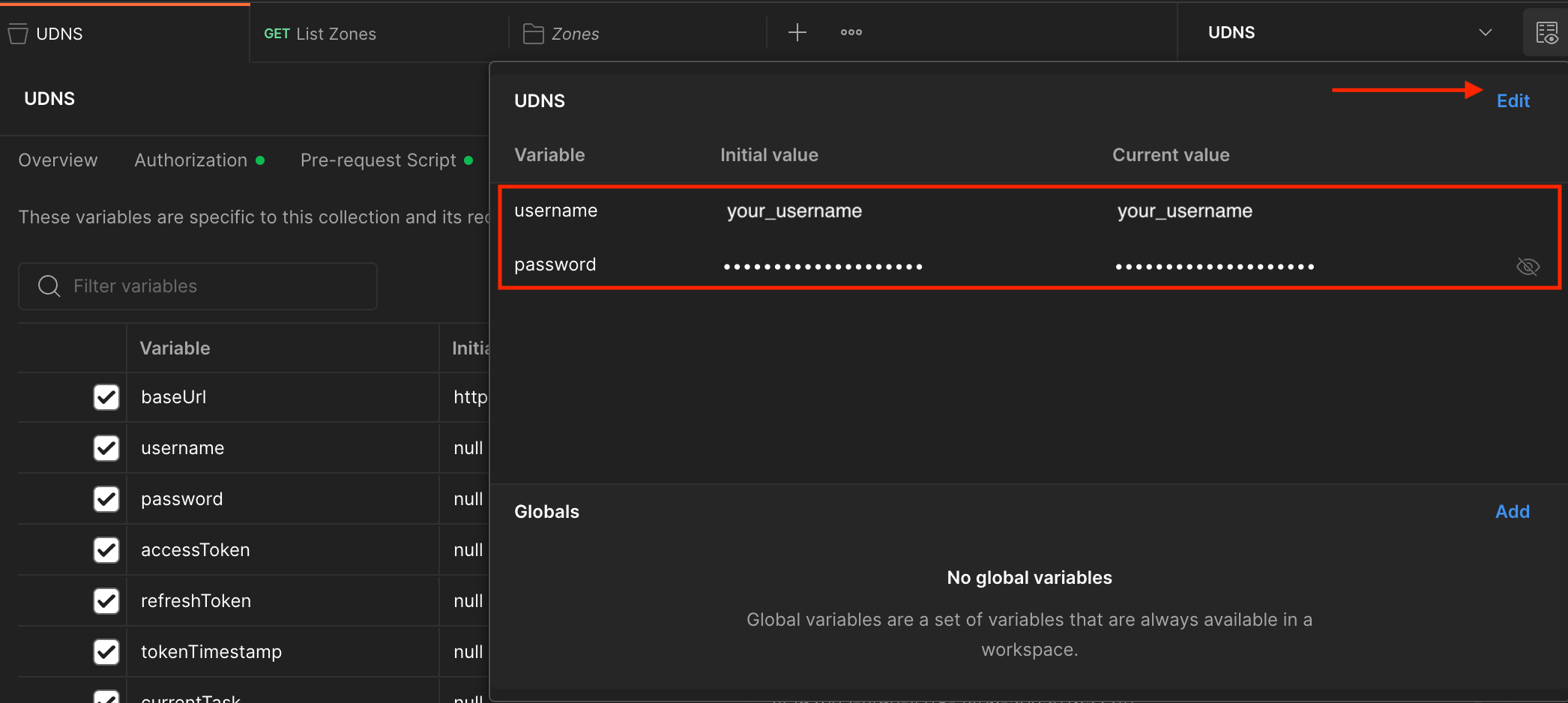
The accessToken and refreshToken will also be stored in your environment.
Resources
Everything is organized into folders, each representing a base resource (zones) or a particular functionality (push notifications).
Zones
This is the largest resource with the most endpoints since it contains the actual DNS config.
Tasks
Operations that produce background tasks will return a 202 status code and have an x-task-id header. We store this under the “currentTask” variable in the environment.
This automatically occurs in the post-response script of the collection.
// Check if the x-task-id header is present in the response
let taskId = pm.response.headers.get("x-task-id");

if (taskId) {
    pm.environment.set("currentTask", taskId);
    console.log(`Saved x-task-id: ${taskId} to currentTask collection variable.`);
}
Reports
The reporting endpoint. After you request a report, you retrieve it from the results endpoint using the report ID. This is stored during the post-request, similar to tasks.
// Check if there's a response body and if the response can be parsed as JSON
if (pm.response.text() && pm.response.headers.get('Content-Type').includes('application/json')) {
    try {
        let resp = pm.response.json();

        // Check if "requestId" exists in the response
        if (resp.hasOwnProperty("requestId")) {
            // Set the "requestId" collection variable
            pm.environment.set("reports_requestId", resp.requestId);
            console.log(`Request ID saved: ${resp.requestId}`);
        }
    } catch (e) {
        // This will catch any errors in parsing the JSON, but do nothing
        // Just in case, so it doesn't somehow cause non-JSON responses to error
    }
}
Collaboration
This collection is designed to be a collaborative tool. While it covers some essential endpoints, there’s room for improvement and expansion. I welcome contributions from the community to enhance this collection. Feel free to fork the repository and submit pull requests.
Let’s work together to make interacting with the UltraDNS API easier and more efficient. I look forward to your feedback and contributions!