Establishing a TTL Policy
Completed
Time To Live (TTL) values specify the time interval that a resource record may be cached before the source of the information should again be consulted. As such, the TTL values you set for your DNS records have a big impact on the number of authoritative queries your UltraDNS account will receive. Longer TTL values will result in fewer authoritative queries since the cached responses will be reused, whereas shorter TTL values result in more authoritative queries since cached responses will expire more frequently.
Your UltraDNS account provides a TTL Settings section that you can use for establishing a policy around TTL values (see Accounts → [Account Name] → TTL Settings:
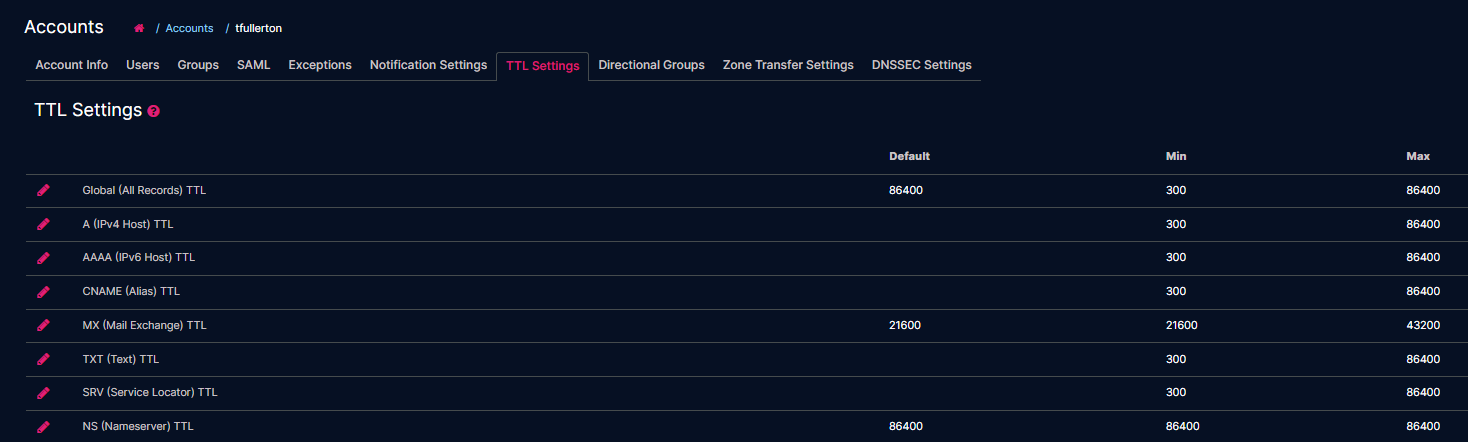
From here you can specify a default TTL to use for any record that doesn't have it's TTL value explicitly set by a user adding a record. On a per record type basis you can configure minimum TTL values as well as maximum TTL values.
In the screenshot above I've configured a TTL policy for my MX (Mail Exchange) record types that limits TTL settings to as low as 21600 and as high as 43200. If I don't specify a TTL value when creating an MX record the system will set the TTL to 21600. This allows me to be consistent with TTL best practices. I also have specified a Global default value of 86400 which errs on the side of being more cautious and reducing query volumes. If I wasn't concerned with query volumes and costs I would use much lower values for Default (300), Min (300), and Max (3600) values.