Snapshot CLI: Effortless Management of DNS Snapshots and Restorations
Completed
Hello all,
Hope you had a great July.
I want to share a simple CLI tool I've developed that utilizes the zone 'snapshot' and 'restore' functionalities within UltraDNS.
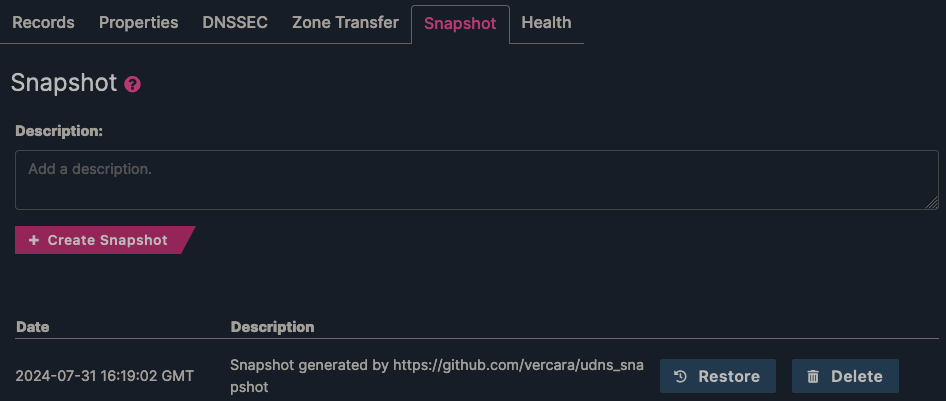
In each zone, you have the ability to create a snapshot of its state at a given point in time. A zone can only have one snapshot, and creating a new snapshot will overwrite the old. The restore mechanism rolls a domain back to its snapshot, provided one exists.
In terms of API usage, these are the /v1/zones/{zone_name}/snapshot and /v1/zones/{zone_name}/restore endpoints, respectively. The /snapshot endpoint will accept POST, GET and DELETE methods. POST (with no body) creates a new snapshot, GET returns the existing snapshot and DELETE deletes the existing snapshot. The /restore endpoint accepts a POST (with no body) and performs the rollback (rolling back a zone doesn't delete the snapshot on record).
Usage
This tool requires Python and a basic understanding of running Python scripts, which I will not cover here. Furthermore, the instructions below are for Unix-like systems. Syntax is a bit different on Windows, and I haven't tested from the Windows command prompt (or Powershell). If you are a Windows user, I'd encourage you to use WSL if you want to follow along with this guide.
Setup
Clone the repository from GitHub.
git clone https://github.com/vercara/udns_snapshot
cd udns_snapshot
If you don't want to install the dependencies system-wide, set up a Python virtual environment.
python -m venv venv
source venv/bin/activate
Install dependencies from requirements.txt.
pip install -r requirements.txtEnsure that the snapshot.py file is executable.
chmod +x src/snapshot.pyHelp dialogue
Running snapshot.py with the -h switch will display basic instructions for usage.
% ./src/snapshot.py -h

  .-------------------.
 /--"--.------.------/|
 |UDNS |__Ll__| [==] ||
 |     | .--. | """" ||
 |     |( () )|      ||
 |     | `--. |      |/
 `-----'------'------'

usage: snapshot.py [-h] [-u USERNAME] [-p PASSWORD] [-t TOKEN] [-r REFRESH_TOKEN] [-s] [-l LOG_FILE] [-d] [-z ZONES_FILE] [-a]

UltraDNS Zone Snapshot

options:
  -h, --help            show this help message and exit
  -s, --restore         Loops through zones and restores them to their most recent snapshot.
  -l LOG_FILE, --log-file LOG_FILE
                        Specify the log file name. Default is 'output.log'.
  -d, --download        Download a zip file with all existing snapshots in an account or specified list.
  -z ZONES_FILE, --zones-file ZONES_FILE
                        Specify a file containing a list of zones (one per line).
  -a, --all-zones       Iterate through every zone in a given account.

authentication:
  -u USERNAME, --username USERNAME
                        Username for authentication
  -p PASSWORD, --password PASSWORD
                        Password for authentication
  -t TOKEN, --token TOKEN
                        Directly pass the Bearer token
  -r REFRESH_TOKEN, --refresh-token REFRESH_TOKEN
                        Pass the Refresh token (optional with --token)
Viewing and specifying the output log
This script always writes its output to a log file, and you should review the logs to see any exceptions (such as skipped zones) that occurred during execution. It will give a general explanation of why something was skipped. The default output file name is output.log, but you can specify a different one using the --log-file or -l switch.
./src/snapshot.py -u 'your_username' -p 'your_password' -z zones.txt -l output2.logSpecifying a list of zones
This script requires you indicate whether you want to work with a small subset of zones or every zone in the account. You can specify a file which contains a list of zone names. What the script expects is a plaintext file with each zone separated by line breaks.
example1.com
example2.com
example3.com
The argument is -z or --zones-file followed by the filename.
Alternatively, the --all-zones (-a) argument will iterate through every zone that exists under the account. Please use this with caution.
Creating a backup of existing snapshots
Using the --download or -d argument instructs the script to retrieve copies of existing zone snapshots. This will be a JSON output with zone data (resource records, web forwards, etc.), effectively a zone file representative of the state at the time which the backup occurred. The .json files will be collected and placed in a .zip archive in your working directory.
./src/snapshot.py -u 'your_username' -p 'your_password' -d --all-zonesCreating new snapshots
WARNING: Creating a snapshot overwrites existing snapshots and this cannot be undone. I suggest making backups first, just in case they're needed for reference at a future time.
The default behavior for the script when no other arguments are supplied is to create snapshots for every zone in the account.
./src/snapshot.py -u 'your_username' -p 'your_password' -z zones.txtCertain types of zones can't have snapshots, i.e. ALIAS and SECONDARY, and will be skipped.
Restoring zones from their snapshot
WARNING: This is destructive behavior. It reverts changes to zones, based on the time its last snapshot occurred, and this cannot be easily undone.
The --restore or -r argument will initiate the process of rolling each zone back to its most recent snapshot on record.
Closing
Let me know if you find scripts like this helpful, and stay tuned because next month, I will share a more elaborate suite of zone exportation tools I've been developing. As always, contributions are encouraged. Feel free to submit PRs or comment here with ideas/bug fixes.