Partially Updating Resource Sets with JSON-PATCH
Completed
In UltraDNS, we often collapse properties into ordered lists for simplicity and a more compact data model, rather than treating them as separate objects. Text records (TXT) serve as a prime example, as it's common for a domain to have multiple TXT records associated with the same host.
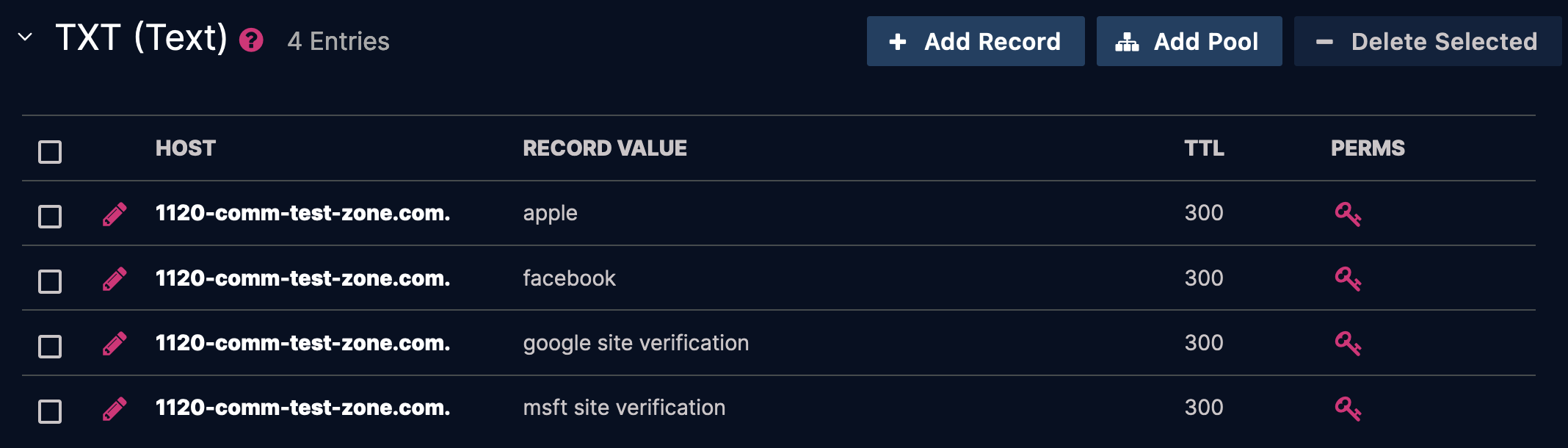
Above we have an example of four individual TXT records. In a BIND zone file, this would be expressed as:
@	300	IN	TXT	"apple"
@	300	IN	TXT	"facebook"
@	300	IN	TXT	"google site verification"
@	300	IN	TXT	"msft site verification"
If we adhered to a BIND-like approach where each TXT record is treated as a separate object, the equivalent representation in JSON might look like this:
{
    "zoneName": "1120-comm-test-zone.com.",
    "rrSets": [
        {
            "ownerName": "1120-comm-test-zone.com.",
            "rrtype": "TXT (16)",
            "ttl": 300,
            "rdata": "apple"
        },
        {
            "ownerName": "1120-comm-test-zone.com.",
            "rrtype": "TXT (16)",
            "ttl": 300,
            "rdata": "facebook"
        },
        {
            "ownerName": "1120-comm-test-zone.com.",
            "rrtype": "TXT (16)",
            "ttl": 300,
            "rdata": "google site verification"
        },
        {
            "ownerName": "1120-comm-test-zone.com.",
            "rrtype": "TXT (16)",
            "ttl": 300,
            "rdata": "msft site verification"
        }
    ]
}
While this representation is technically valid, it introduces unnecessary verbosity. To streamline operations, you might include a guid parameter for each record to uniquely identify it. However, this approach permits the possibility of setting a separate TTL for each record—an option BIND supports but is generally discouraged.
In UltraDNS, we take a more concise and practical approach. The same data is represented as:
{
    "zoneName": "1120-comm-test-zone.com.",
    "rrSets": [
        {
            "ownerName": "1120-comm-test-zone.com.",
            "rrtype": "TXT (16)",
            "ttl": 300,
            "rdata": [
                "apple",
                "facebook",
                "google site verificationv",
                "msft site verification"
            ]
        }
    ]
}
This representation is significantly more compact. However, it raises an important question: can the data within the rdata list be partially updated using a PATCH operation? Intuitively, the answer might seem to be "no," as it would require replacing the entire list via a PUT operation. However, thanks to RFC 6902 and JSON-PATCH, we have a mechanism to navigate partial updates effectively.
Choosing Between PUT, PATCH, and JSON-PATCH
While this document focuses on JSON-PATCH, it’s important to note that UltraDNS supports PUT, PATCH, and JSON-PATCH for modifying resources like rrsets. The choice of which method to use is entirely up to the user and depends on the specific requirements of the operation.
For example:
-
PUTis ideal for replacing the entire resource. -
PATCHallows partial updates with a simpler payload. -
JSON-PATCHprovides precise control over individual changes using structured operations.
Each method has its strengths, and users should choose the approach that aligns best with their workflow.
Content-Type Header
A JSON-PATCH payload differs from a standard PATCH in its structure and intent. When sending a JSON-PATCH request, you must include the Content-Type header with the value application/json-patch+json. This informs the API how to correctly interpret and parse your request. Omitting this header will result in the API failing to process your request properly.
Data Structure
When working with JSON-PATCH, lists of rdata are enumerated using their zero-based index values. For example:
"rdata": [                       // Position in list:
    "apple",                     // 0
    "facebook",                  // 1
    "google site verificationv", // 2
    "msft site verification"     // 3
]
The position of each rdata entry in the list is crucial, as it serves as the identifier for modifying specific elements.
JSON-PATCH Payload
The JSON-PATCH payload is represented as an array, where each element specifies an operation. This array can include multiple operations, each requiring an operation type (op) and a resource path (path). Some operations also require a value.
[
    {
      "op": "type of operation",
      "path": "/path/to/json/resource",
      "value": "int/string/array - depends on what's being modified and the operation"
    }
]
JSON-PATCH Operators
JSON-PATCH defines six standard operators, but UltraDNS supports only four in its implementation. Using rrsets (specifically TXT records) as an example, here’s how the supported operators work in the context of rdata:
-
add- Adds a new record to the list. -
remove- Remove an existing record. -
replace- Updates therdataof an existing record. -
move- Changes the position of a record within the ordered list.-
Note: The
movefunctionality is limited. More on that later.
-
Note: The
The copy and test operators are part of the JSON-PATCH standard but are not implemented in UltraDNS.
Examples
In the following examples, we’ll modify TXT records at the apex of the test zone 1120-comm-test-zone.com.. Each example will include the URI, the JSON-PATCH payload, and a screenshot showing the results.
The expected response for all operations is an HTTP 200 OK status code.
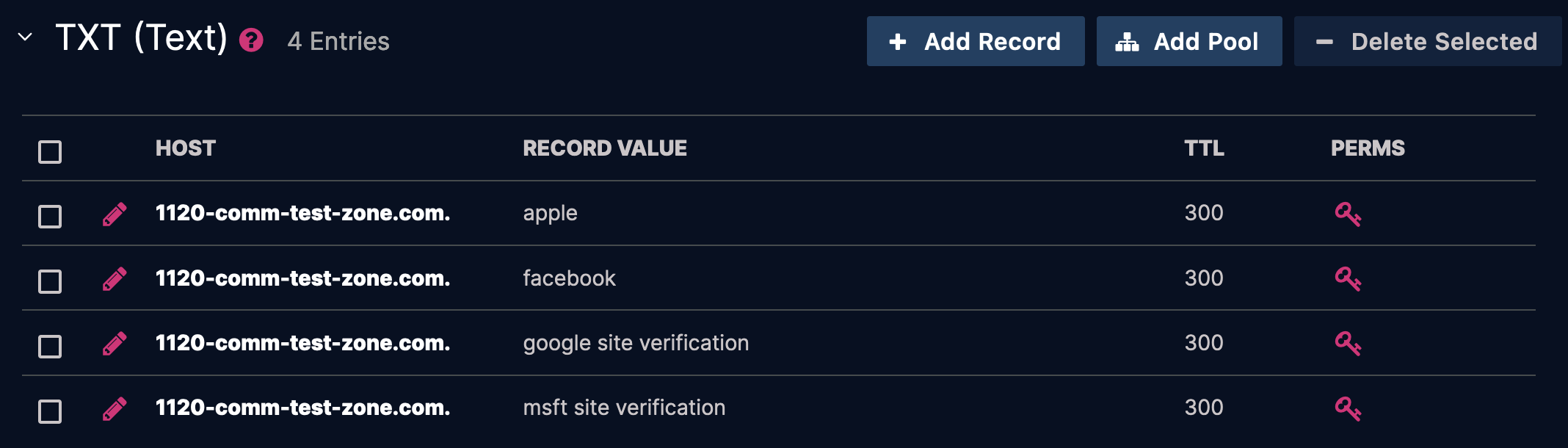
Below is the initial state of the TXT records in the test zone:
Add
Append a piece of rdata to the list.
Part 1
-
URI:
https://api.ultradns.com/v3/zones/1120-comm-test-zone.com./rrsets/TXT/1120-comm-test-zone.com. -
Payload:
[ { "op": "add", "path":"/rdata/-", "value": "v=spf1 redirect=example.com" } ]-
Note: The special index
-tellsJSON-PATCHto simply add to the end of the list, however UltraDNS sortsrdataalphanumerically on the backend, so that is not necessarily where it will show up.
-
Note: The special index
Request
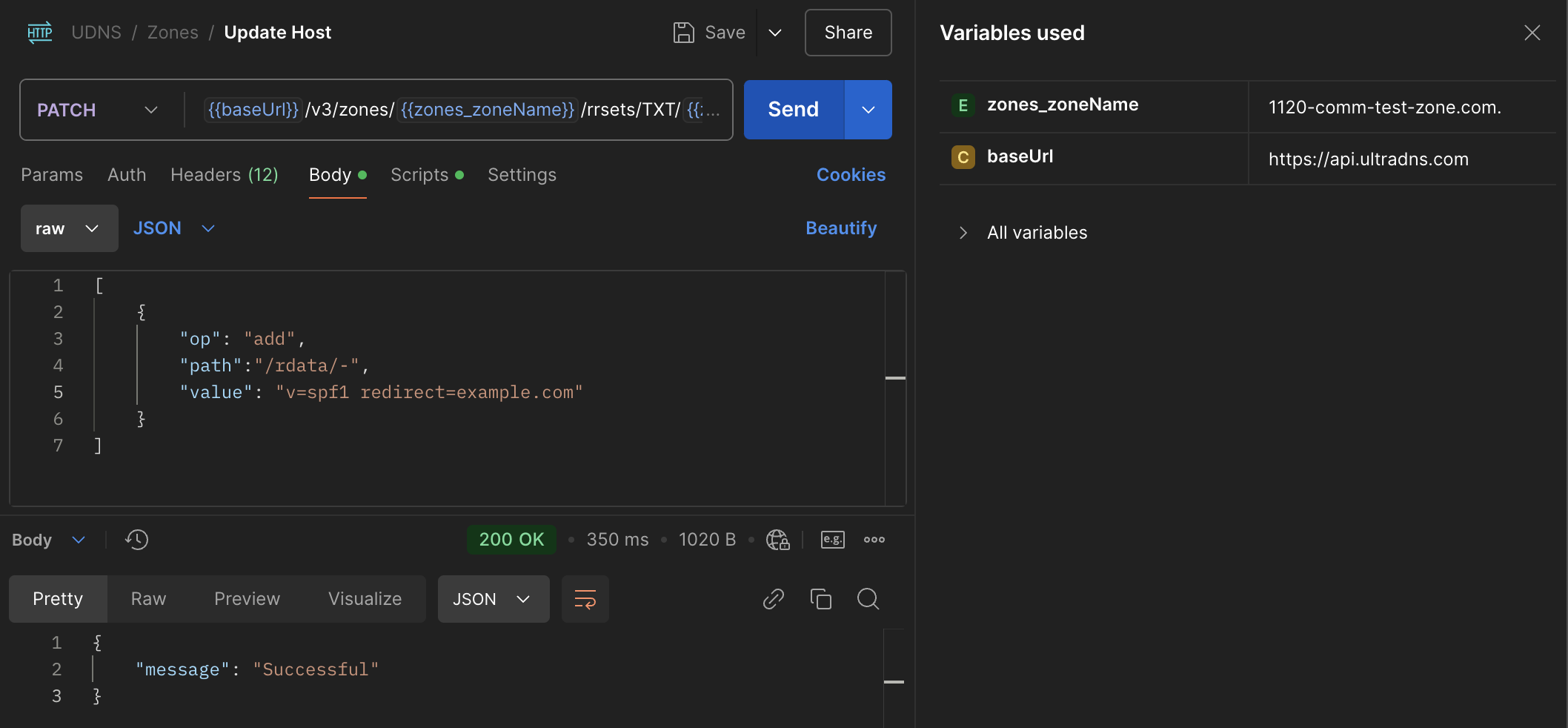
cURL
curl -X PATCH \
  https://api.ultradns.com/v3/zones/1120-comm-test-zone.com./rrsets/TXT/1120-comm-test-zone.com. \
  -H "Authorization: Bearer <token>" \
  -H "Accept: application/json" \
  -H "Content-Type: application/json-patch+json" \
  -d '[
        {
          "op": "add",
          "path": "/rdata/-",
          "value": "v=spf1 redirect=example.com"
        }
      ]'
Result
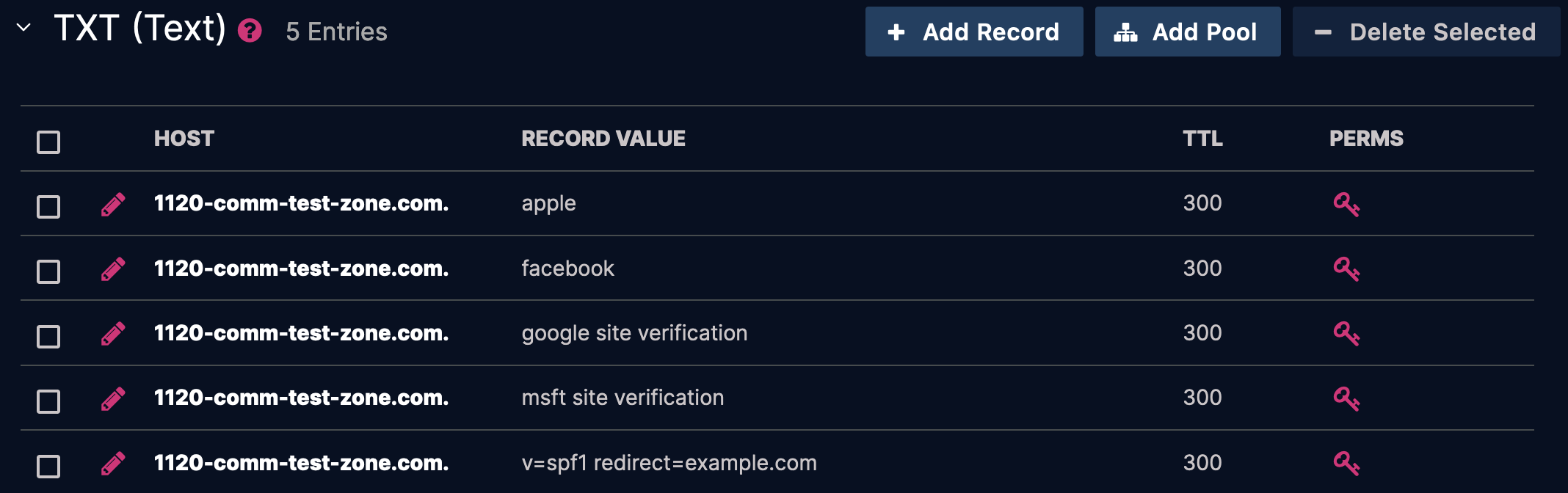
JSON
"rdata": [                        // Position in list:
    "apple",                      // 0
    "facebook",                   // 1
    "google site verification",   // 2
    "msft site verification",     // 3
    "v=spf1 redirect=example.com" // 4
]
Part 2
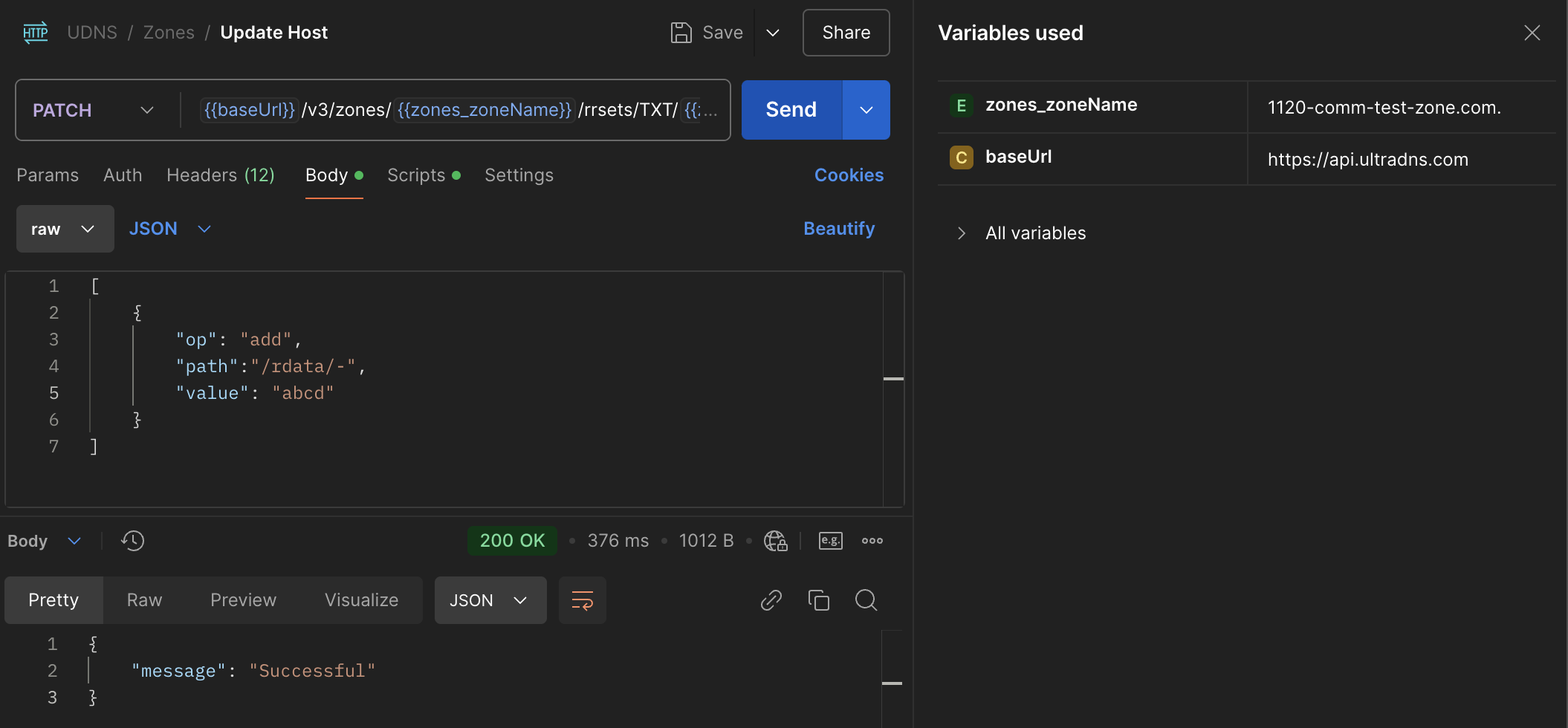
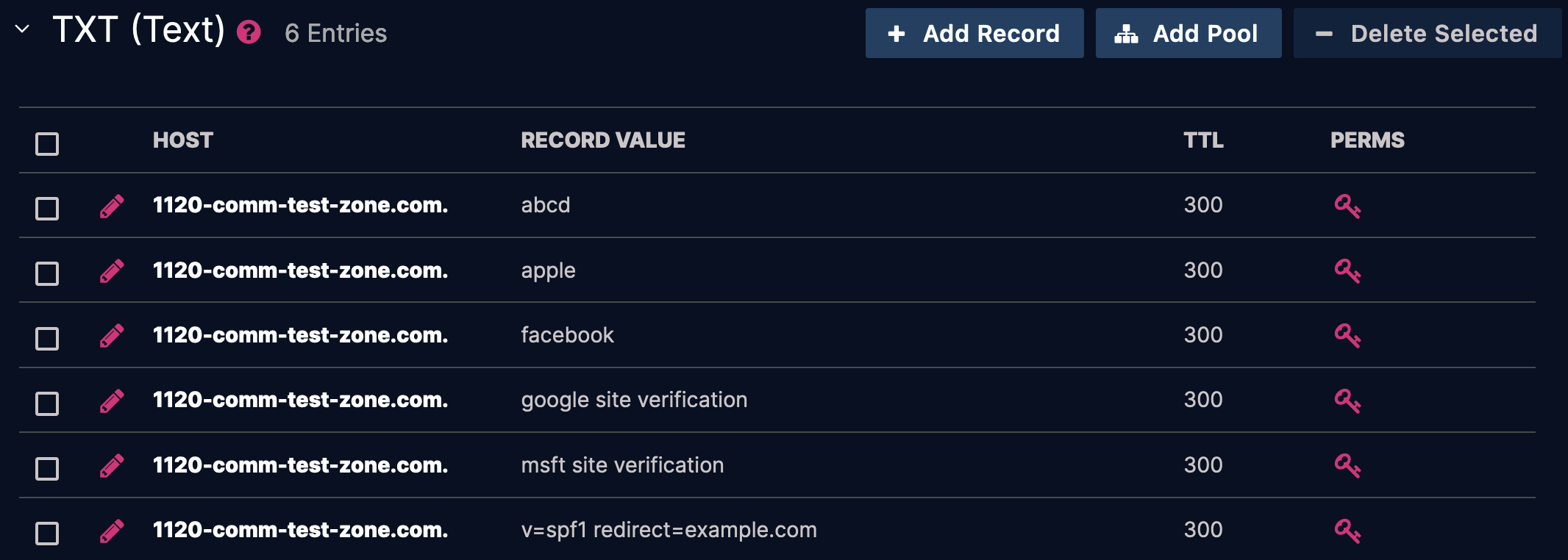
In this example, I'll add a second item with a different alphanumeric value to illustrate how UltraDNS sorts rdata.
-
URI:
https://api.ultradns.com/v3/zones/1120-comm-test-zone.com./rrsets/TXT/1120-comm-test-zone.com. -
Payload:
[
	{
		"op": "add",
		"path":"/rdata/-",
		"value": "abcd"
	}
]
Request
cURL
curl -X PATCH \
  https://api.ultradns.com/v3/zones/1120-comm-test-zone.com./rrsets/TXT/1120-comm-test-zone.com. \
  -H "Authorization: Bearer <token>" \
  -H "Accept: application/json" \
  -H "Content-Type: application/json-patch+json" \
  -d '[
        {
          "op": "add",
          "path": "/rdata/-",
          "value": "abcd"
        }
      ]'
Result
JSON
"rdata": [                        // Position in list:
    "abcd",                       // 0
    "apple",                      // 1
    "facebook",                   // 2
    "google site verification",   // 3
    "msft site verification",     // 4
    "v=spf1 redirect=example.com" // 5
]
Note: In this case, abcd is positioned at the top. If we had created an entry that starts with b, as an example, it would have positioned itself between apple and facebook.
Remove
Remove rdata from the list.
-
URI:
https://api.ultradns.com/v3/zones/1120-comm-test-zone.com./rrsets/TXT/1120-comm-test-zone.com. -
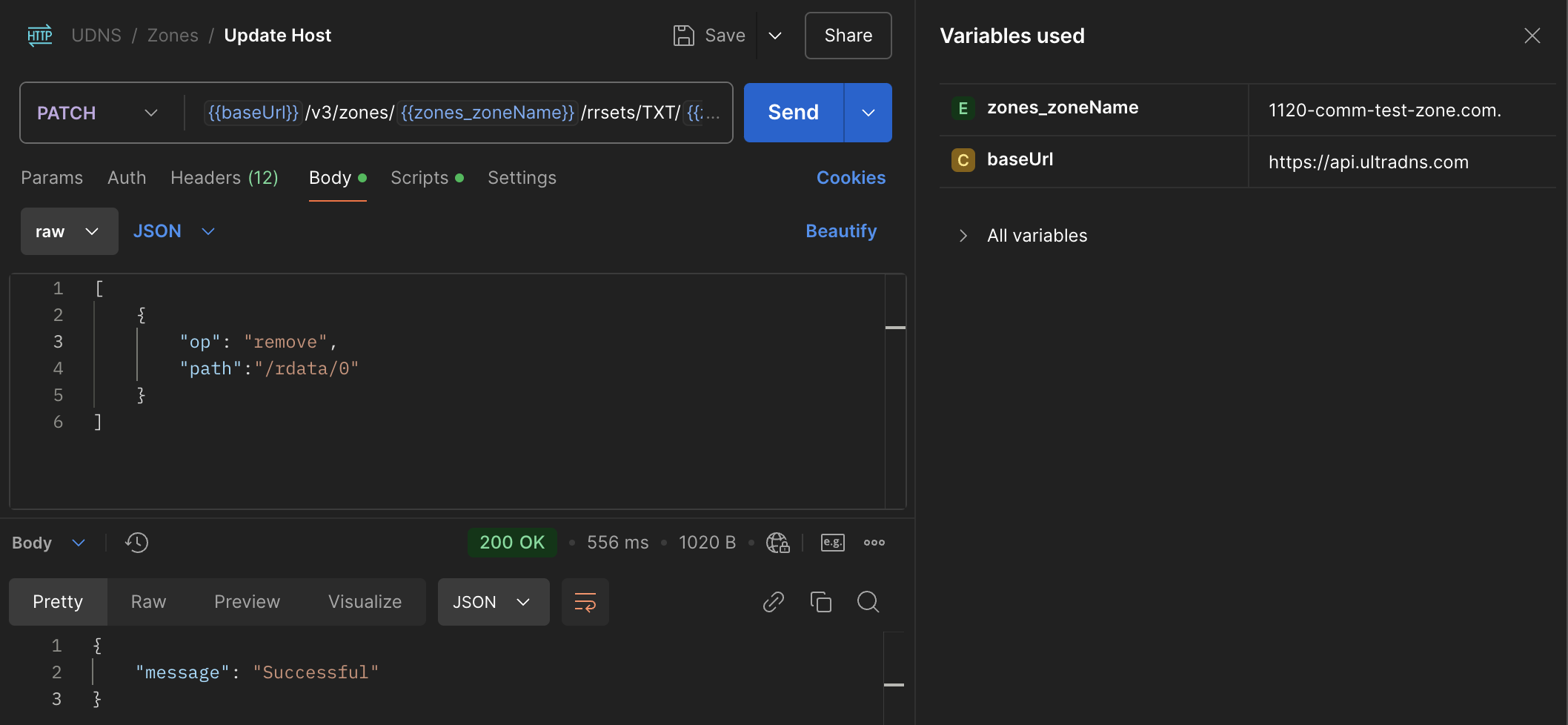
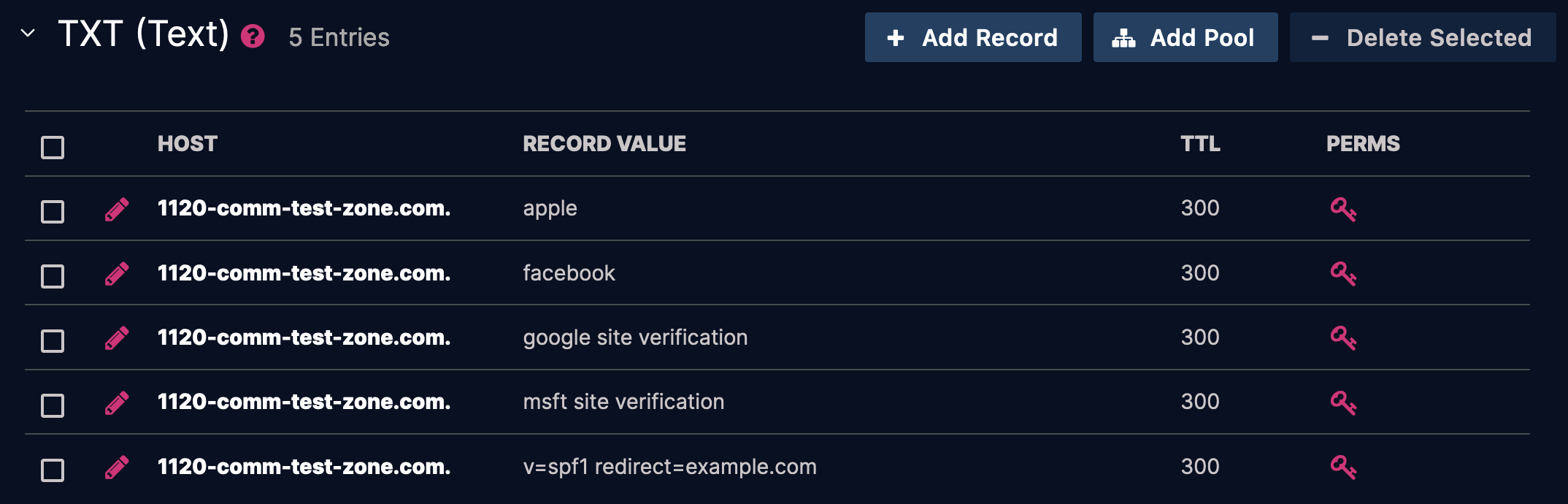
Payload: The following will remove the
abcdrecord added to position0in the previous example.[ { "op": "remove", "path":"/rdata/0" } ]- Note: A value is not needed for this operator.
Request
cURL
curl -X PATCH \
  https://api.ultradns.com/v3/zones/1120-comm-test-zone.com./rrsets/TXT/1120-comm-test-zone.com. \
  -H "Authorization: Bearer <token>" \
  -H "Accept: application/json" \
  -H "Content-Type: application/json-patch+json" \
  -d '[
        {
          "op": "remove",
          "path": "/rdata/0"
        }
      ]'
Result
JSON
"rdata": [                        // Position in list:
    "apple",                      // 0
    "facebook",                   // 1
    "google site verification",   // 2
    "msft site verification",     // 3
    "v=spf1 redirect=example.com" // 4
]
Replace
Replace the value of an existing record.
-
URI:
https://api.ultradns.com/v3/zones/1120-comm-test-zone.com./rrsets/TXT/1120-comm-test-zone.com. -
Payload: Replace the value
facebookwithinstagram.[ { "op": "replace", "path":"/rdata/1", "value":"instagram" } ]
Request
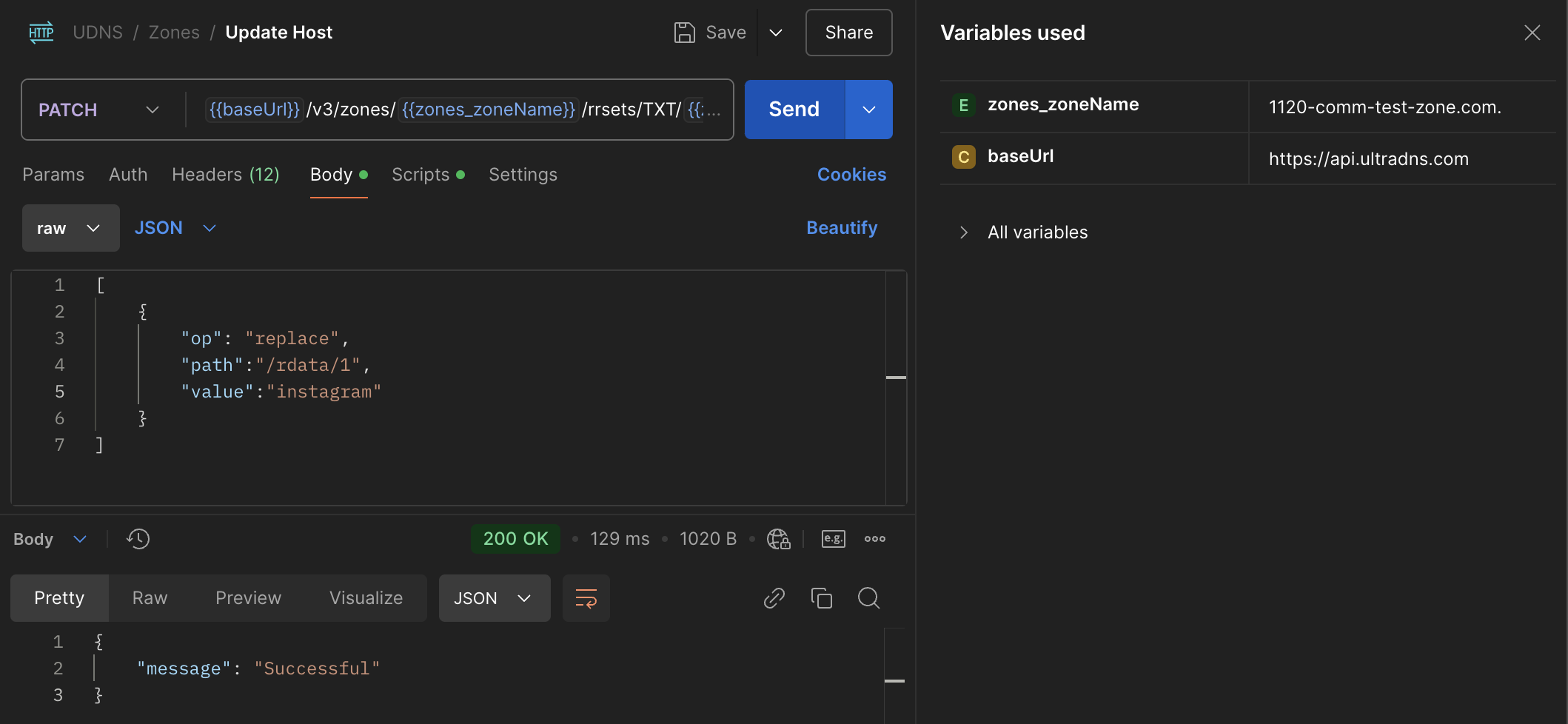
cURL
curl -X PATCH \
  https://api.ultradns.com/v3/zones/1120-comm-test-zone.com./rrsets/TXT/1120-comm-test-zone.com. \
  -H "Authorization: Bearer <token>" \
  -H "Accept: application/json" \
  -H "Content-Type: application/json-patch+json" \
  -d '[
        {
          "op": "replace",
          "path": "/rdata/1",
          "value": "instagram"
        }
      ]'
Result
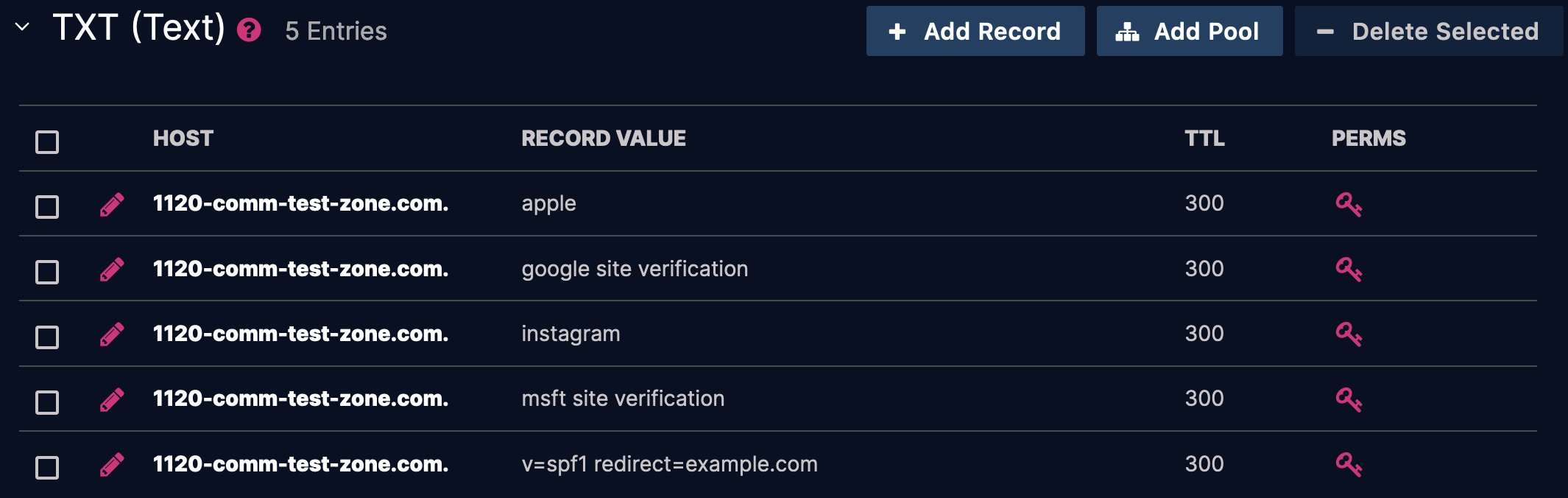
JSON
"rdata": [                        // Position in list:
    "apple",                      // 0
    "google site verification",   // 1
    "instagram",                  // 2
    "msft site verification",     // 3
    "v=spf1 redirect=example.com" // 4
]
Note: This also changes the position of the record in the list.
Move
The move operation is not valid for the type of records we’re handling here, as rdata within rrsets is automatically sorted alphanumerically. However, the move operation is applicable in scenarios where rdata is grouped into resource pools, such as:
- Resource Distribution (RD) pools
- Simple Load Balancing (SLB) pools
- SiteBacker / Traffic Controller (SB/TC) pools
I can explore these use cases in a separate community topic.
If you attempt to use the move operation on an rrset within the same host, the request will succeed, but no changes will occur due to the enforced alphanumeric sorting. For example:
-
URI:
https://api.ultradns.com/v3/zones/1120-comm-test-zone.com./rrsets/TXT/1120-comm-test-zone.com. -
Payload:
[
	{
		"op": "move",
		"path":"/rdata/2",
		"from":"/rdata/1"
	}
]
The API will return a success message, but the rdata order remains unchanged.
Non-JSON-PATCH
Regular PATCH requests using the standard application/json header are also supported, but in a slightly more limited capacity.
Append RData
This is effectively the same as the JSON-PATCH add operator.
-
URI:
https://api.ultradns.com/v3/zones/1120-comm-test-zone.com./rrsets/TXT/1120-comm-test-zone.com. -
Payload:
{
	"rdata": [
		"abcd",
		"xyz"
	]
}
Request
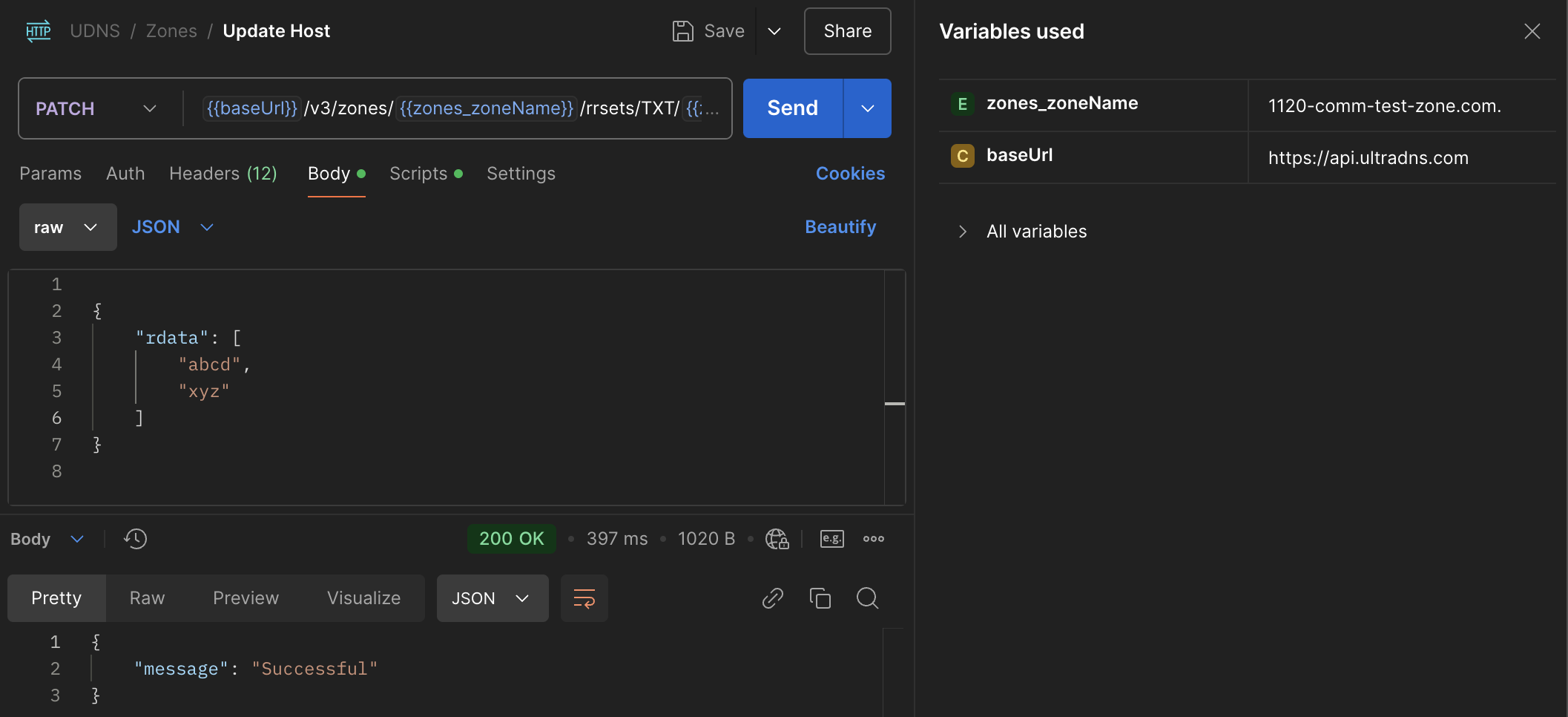
cURL
curl -X PATCH \
  https://api.ultradns.com/v3/zones/1120-comm-test-zone.com./rrsets/TXT/1120-comm-test-zone.com. \
  -H "Authorization: Bearer <token>" \
  -H "Accept: application/json" \
  -H "Content-Type: application/json" \
  -d '{
        "rdata": [
          "abcd",
          "xyz"
        ]
      }'
Result
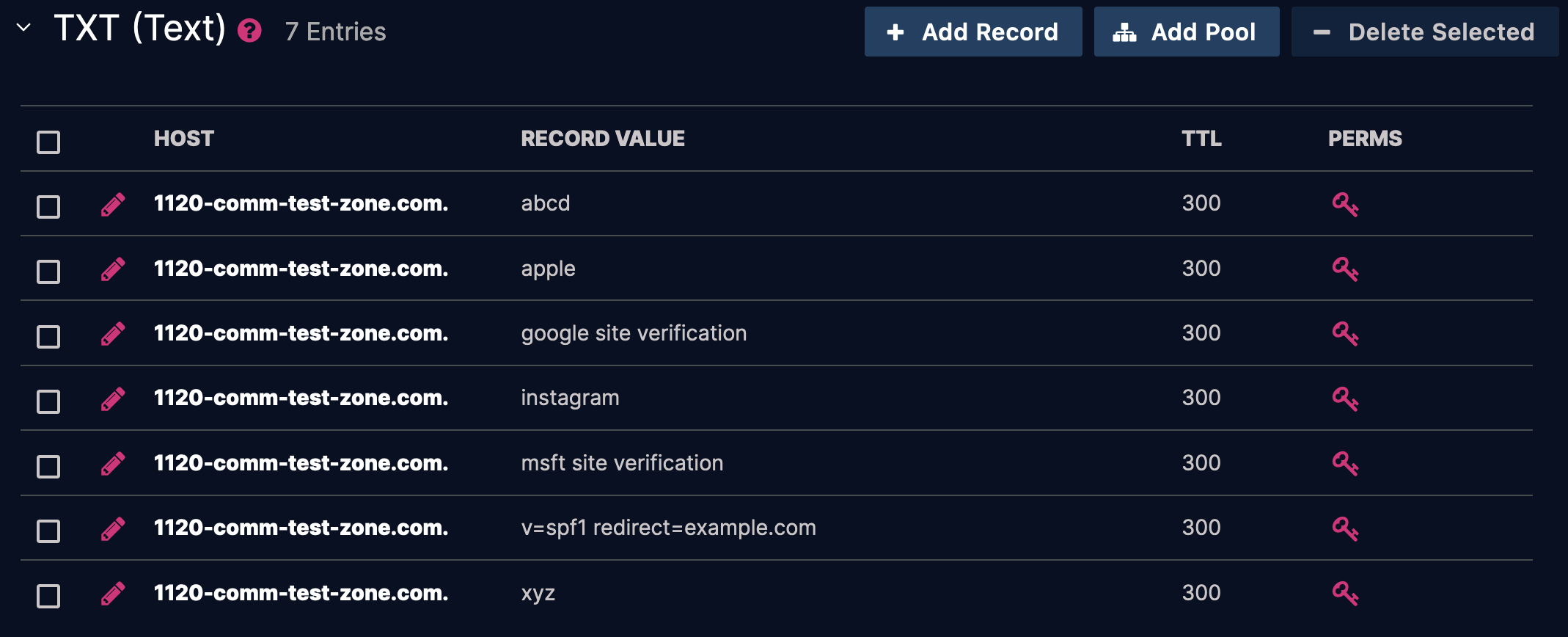
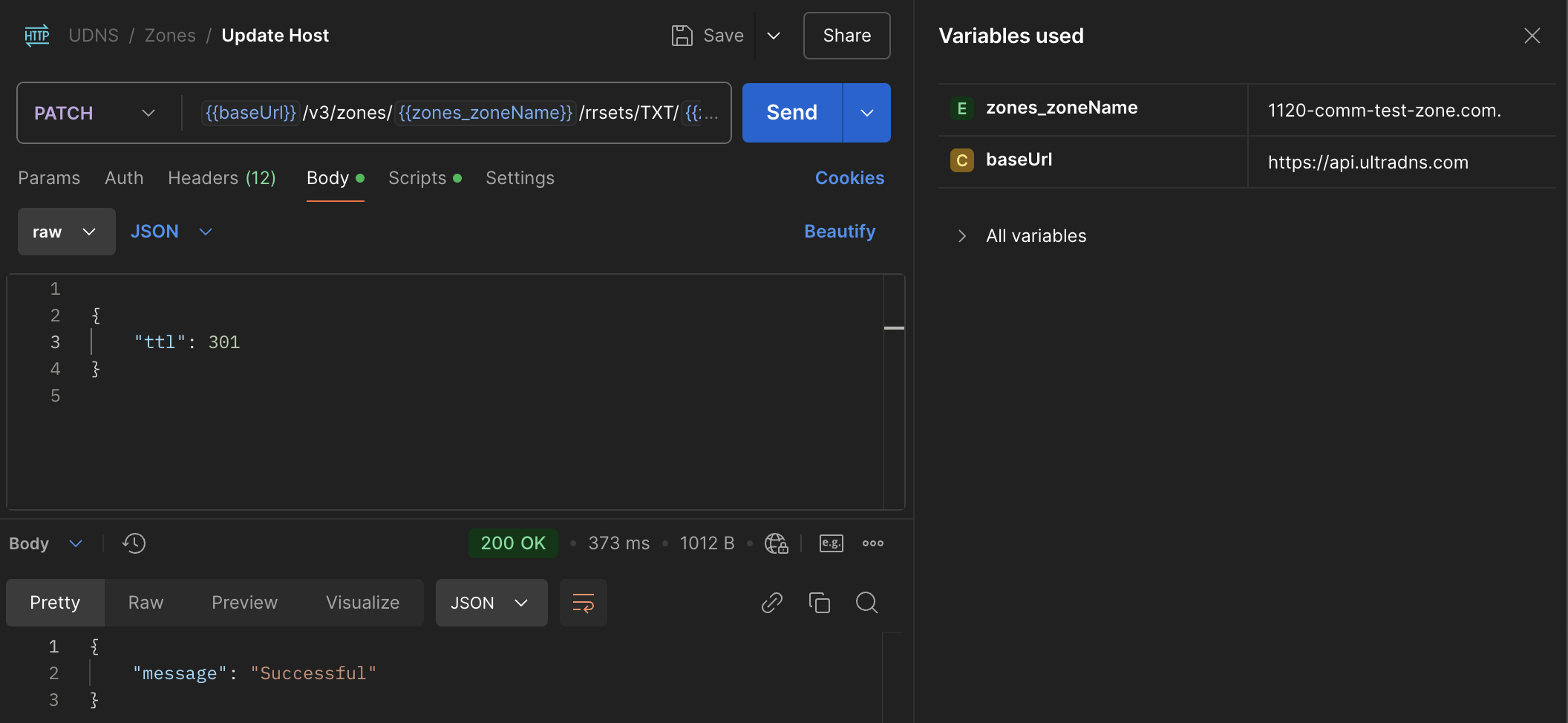
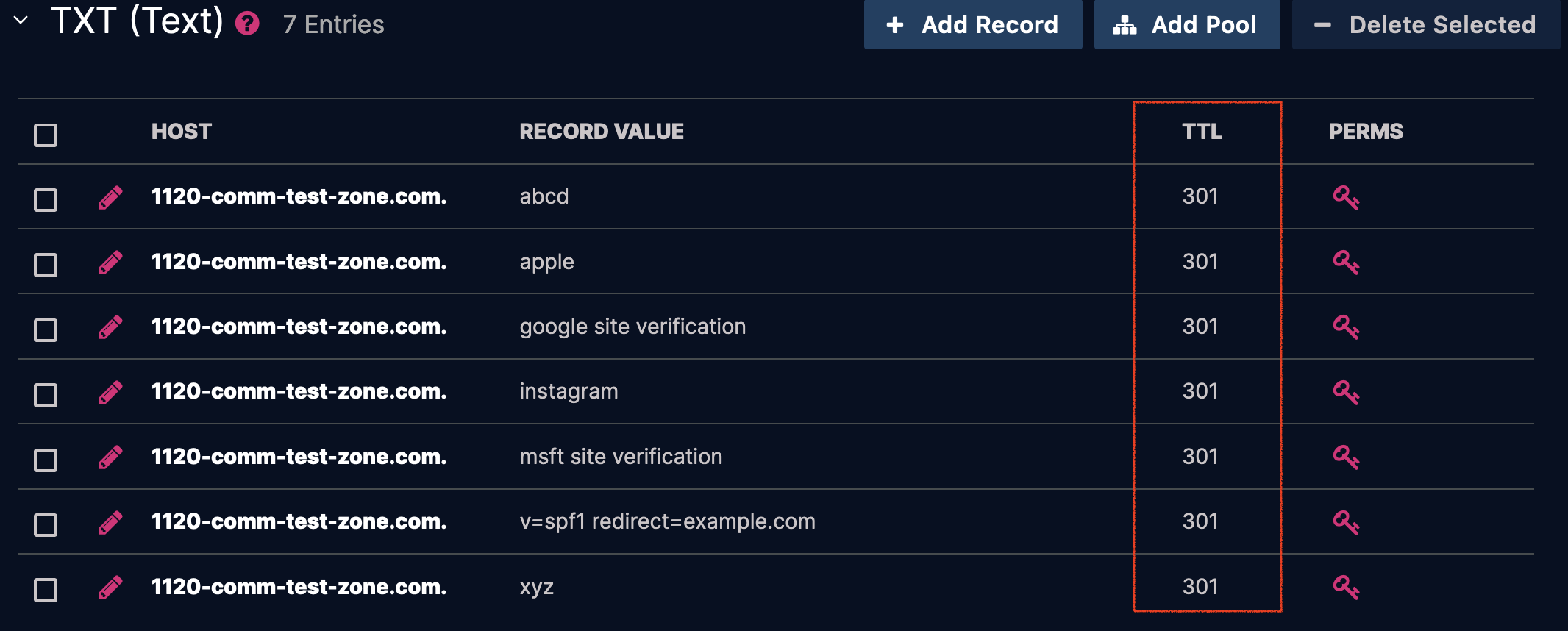
Update TTL
This is the simpler way to modify the TTL of a record, since rrsets can only have a single TTL. Technically, TTLs can also be updated through JSON-PATCH by using the /ttl path.
-
URI:
https://api.ultradns.com/v3/zones/1120-comm-test-zone.com./rrsets/TXT/1120-comm-test-zone.com. -
Payload:
{
	"ttl": 301
}
Request
cURL
curl -X PATCH \
  https://api.ultradns.com/v3/zones/1120-comm-test-zone.com./rrsets/TXT/1120-comm-test-zone.com. \
  -H "Authorization: Bearer <token>" \
  -H "Accept: application/json" \
  -H "Content-Type: application/json" \
  -d '{
        "ttl": 301
      }'
Result
Summary
I hope folks find this information useful. If there's an interest in demonstrating PATCH and JSON-PATCH requests with API endpoints other than rrsets, feel free to reach out—I’d be happy to provide additional examples and demonstrations.